Rebuilding the system behind how a global creative agency staffs creative work
Redesigning how Superside plans, books, and visualises creative capacity, from an AI-built prototype to a company-wide staffing system in three months.
Short version
Superside was replacing its staffing model with day-by-day bookings, changing how hundreds of people planned and managed creative work.
I kickstarted the project by making the concept tangible and mapping its risks, built a high-fidelity prototype with AI to test the new model, then designed the system across project staffing, workload visibility, and individual capacity. To solve the launch challenge, I proposed a simulation phase that gave the system real data before go-live while helping PMs adapt to the new workflow.
The system was live company-wide, adopted in 97% of projects and used by ~10 traffic managers, ~100 PMs, and ~350 creatives. Time to solve a staffing ticket went down from 14.4h to 8.2h.
My role and scope: I was the only designer on the project and owned it end to end: from the first concept, through building and testing the prototype, to designing the system in detail and helping shape the rollout strategy. I worked closely with Product and Engineering throughout, and partnered with Creative Operations and Enablement on training and rollout, acting as their product point of contact for the full three months.
The problem
Superside had hundreds of creatives working across hundreds of projects every day, but no reliable way to see who was working on what, or any predictability in capacity forecasting.
The old staffing system had three major weak points:
- It spread a given amount of estimated hours evenly across a timeline, so a creative might show up as busy for 1h a day over 10 days, instead of 5h a day over 2 days, for example. The automatic distribution wasn’t designed to reflect how creative work actually happens.
- No visibility, no transparency: staffing happened mostly inside individual projects, and the information stayed siloed, making it difficult for leaders to see what was happening across accounts, studios, and business units.
- It relied on invites: creatives could accept or decline projects, which often delayed the project’s start.
Discovery
It was decided that we would move towards a completely new, booking-based staffing system. So instead of automatic hour distribution, project managers would book creatives by the day, manually. At first, this looked “less automated” but was, in fact, a more reliable way to plan creative work, since creative work is subjective by nature.
Understanding the stakes and the complexity behind it
That would have a lot of downstream implications across the existing system, from how a project was quoted to how creatives logged hours and customers were charged. So I started my discovery journey with one of my favorite artifacts: drawing before-and-after flowcharts in FigJam.
Structuring the foundation
The old staffing flow lived inside each project, which meant almost no one could see across them. A PM couldn’t see the load across a studio. Leadership couldn’t see it across the company. And individual contributors had no centralized place to check where they should be working.
So I first mapped the people who’d actually act on staffing, and designed access around what each of them needs:
- Project managers book staff project by project, within their own accounts.
- Traffic managers and Ops oversee a Studios and Business Units made up of several accounts, and can book anyone into any project or account within it.
- Leadership gets a company-wide view, so they can see workload and availability, and build forecasts across every business unit, without asking anyone for a status update.
- Creatives get a single source of truth for where they’ve been booked, so it’s always clear where to work.
That’s how we landed on a three-part solution:
Used mainly by PMs, to set up a project and book the resources they need.
A company-wide view with several filters, giving full transparency and serving different needs depending on who you are.
Built for individual contributors (creatives) to check where they've been booked.
Ready to make the idea real
Once the scope and risks got clearer, it was time to make it tangible! The starting point for a higher-fidelity solution was an ideation session using AI to quickly visualise ideas and explore possible directions.
With a better understanding of the possibilities and constraints, I then moved into building a high-fidelity prototype directly in our own codebase. It was a great opportunity for me to get familiar with the company’s codebase and development practices. It was also through this prototype that I learned how to ship features directly into production.
That prototype became the key artifact of the project for around a month. We used it everywhere: from stakeholder meetings and alignment on rules and the overall experience, to technical reviews.
Having a single artifact that was equally valuable to stakeholders and engineering was incredibly productive.
- For stakeholders and strategic discussions, they could interact with a high-fidelity product and experience what it would actually feel like. Decisions were also captured directly in the code.
- For engineering, the prototype already contained many of the rules and logic, which meant they could reuse a lot of what I had built.
- For example, for one of the features (Tentative bookings), 10 of 24 new files in production had the same name as my files in prototype. How close the files are: the hover styles are 91% the same, the hover component 40%, the row 29% and the popover entry 15%.
Testing it with the people who’d feel it first
We knew this would change how PMs and Account Leads worked every day, so before locking anything in, I walked 7 Group Account Directors and 4 Project Managers through rough sketches and the process change behind it.
Reactions were split. About half were excited and ready to move. The other half were skeptical enough that one told me flatly: “This will fail on day 2.”
Adoption was as big a risk as the design itself. If PMs didn't trust the system early on, nothing else would matter.
From the interviews, I generated a research report in Notion with the main pain points, insights and next steps recommendations.
From there, stakeholders realised we’d need a very solid rollout and enablement plan, which led me to work in very close contact with Ops throughout the entire project, identifying risks as we found them and showing how design and process could address each one.
Designing the final solution
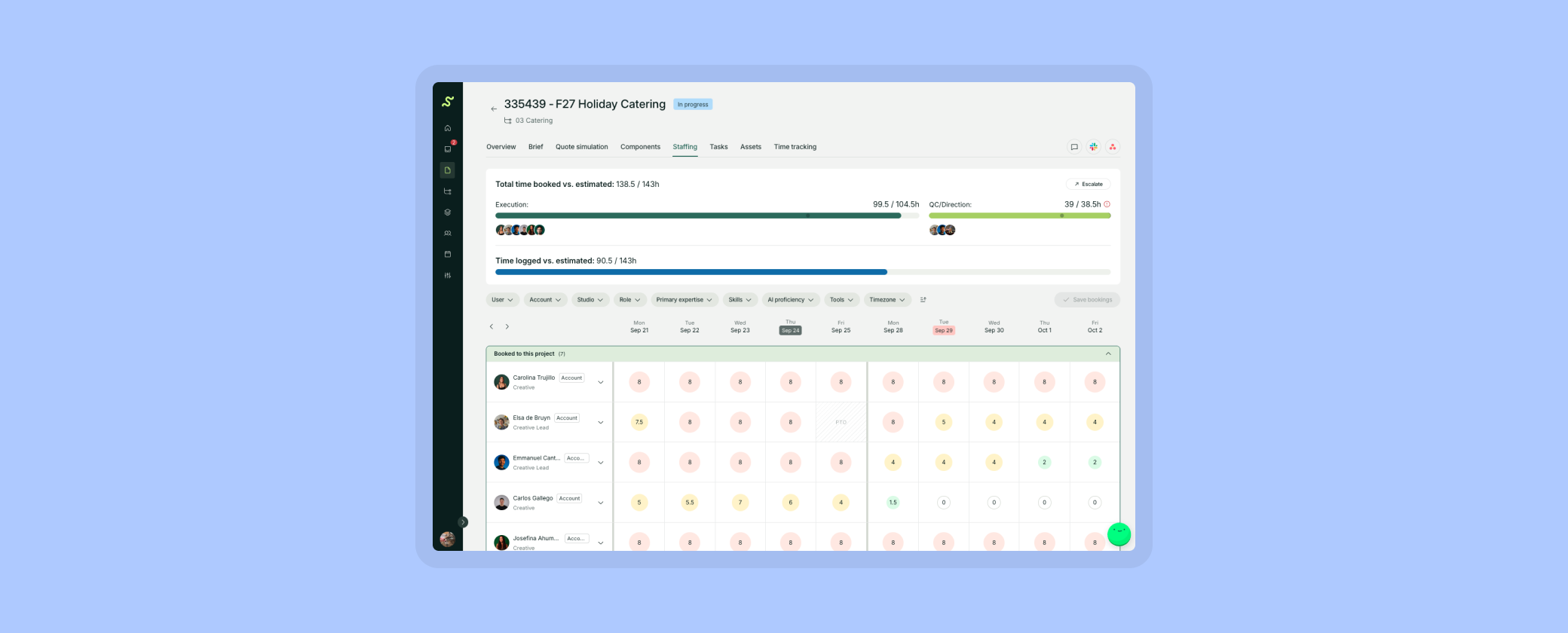
The core of the new system replaces invites and averages with direct bookings: a PM commits a person to specific hours on specific days, on a shared timeline, and that commitment is visible to everyone who needs it, not just the people in that project.
Workload table evolution: using color and size for a quick scan of capacity
The workload table is numbers-heavy by nature, so one requirement stood out: it had to be easy to scan and identify problems at a glance. My first sketches showed plain numbers per person, per day. I switched to coloured circles instead (green, yellow, red), with different sizes (small, medium, large), so anyone scanning a week could quickly see who’s light, who’s full, and where things are tight, much like reading a heat map.
The hours widget: a quick way to understand project health
Project managers are constantly checking whether a project is on track: Is the scope still right? Are booked and logged hours where they should be? Is the team staying within budget? And, most importantly, are there early signs that they’ll need more budget or more time to deliver?
The hours widget brings all of that information together, right where they need it. No more wild formulas in a spreadsheet or jumping between different places to piece together the picture. At a glance, PMs can understand the project’s current health and spot potential problems early.
Better visibility on PTOs and overbookings
A true capacity system has to reflect real people’s capacity, and real people take time off. Personal time off (PTO) is managed in a third-party app, so we built an integration to reflect it in the booking system.
That integration introduced a new layer of complexity: how to visualise different types of PTO in the UI, from full-day and half-day PTOs to PTOs overlapping with existing bookings and creating overbookings. It also meant defining how the system should handle the errors and edge cases that came with them.
Release strategy
Working with Ops and Enablement
Discovery and designing the new system were just half the job. The other half was making sure the people running the studios could actually use what we built. Throughout the three months of the project, I partnered closely with Creative Operations and Enablement on training, kickoff decks, and the broader go-to-market plan. I supported office hours with users, answered questions as people went through the new flow for the first time, and was something of a technical point of contact throughout the training phase and rollout.
Solving the cold start problem
Even with the model and roles right, the rollout plan had one problem that could undermine users’ trust: on day one of the new system, every project’s bookings would start empty, but people were still carrying real, ongoing work from the weeks before. A PM could book someone who looked free, when in fact they weren’t. A few of those experiences in the first days could make the whole team stop trusting the numbers, right when trust mattered most.
I proposed a simulation/backfill phase to fix it: for about two weeks before each studio’s go-live, PMs would run both systems side by side, staffing the old way while also filling out the new booking page as a simulation. The front-end saved real numbers to the database but triggered none of the downstream effects of a real project, so it was safe to get wrong.
By day one, the new system would already have two weeks of real data behind it instead of a blank slate, and PMs would be confident using it, since the simulation also acted as a training phase.
That idea became the backbone of the rollout. We ran it in three phases: One studio went through the two-week simulation first, then moved fully onto the new system while the rest of the company started its own simulation. Once that finished, the whole company went live together.
Mint Studio went through the two-week simulation first.
Mint Studio moved fully onto the new system while the rest of the company started its own simulation.
Once that was complete, the whole company went fully live together.
The feedback repository
Throughout the pilot, we collected a lot of feedback from PMs. Together with Ops, we created a feedback repository in Notion to collect and organize everything we heard. We held weekly meetings to review the repository and decide which items to address next.
Results
The system is now live company-wide, with 97.5% of projects booked in the new system (against a 100% target). The full arc, from an AI prototype to a single source of truth for staffing, took three months.
Around 100 project managers and 10 traffic managers using it to book and manage the workload of ~350 creatives, daily.
Staffing resolution time went down from 14.4h to 8.2h (median).
And, thanks to the simulation phase, the switch went smoothly: PMs were already trained and confident on day one, while Product had time to refine interactions and fix bugs before the full launch.