Placy: a place-saving app I designed, coded, and shipped to the App Store on my own
My first time vibe coding an entire app to solve a real need: a better way to organize the places I want to visit with friends.
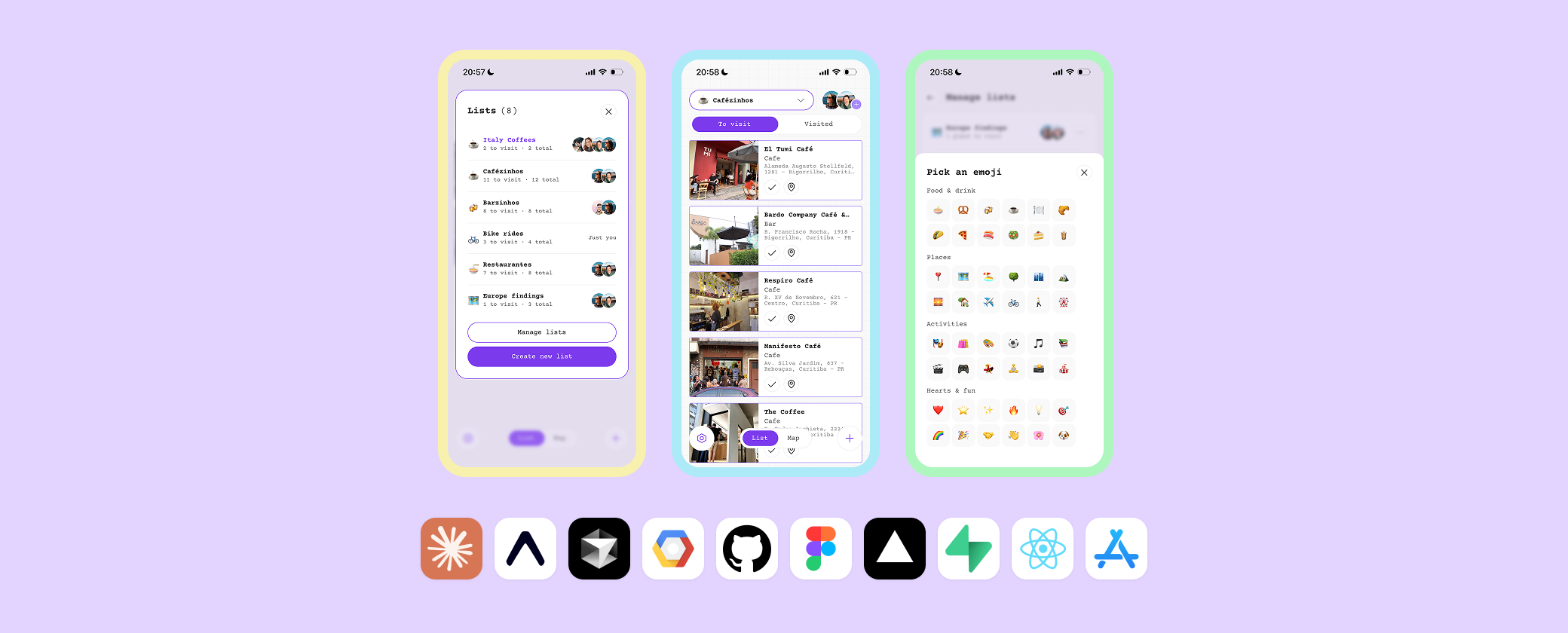
Short version
The problem. I always struggled to keep up with all the places I wanted to visit, either by myself or with friends. I tried notes apps, WhatsApp conversations, lists in Instagram — but somehow I never knew where to go whenever someone would ask me: “do you know a cool coffee spot where we can grab a drink?”
What I did. I used this opportunity to teach myself how to vibe code for real! I designed Placy from scratch and using AI in every single step of the way, from the PRD to the final live product. I tried to not get too hung up on design and styling decisions, and instead learn more about code and app development lifecycle.
The outcome. Placy is live and shipped to the Apple App Store since August 2026. Currently with 117 users, 168 lists and more than 800 places saved (data from early November 2026).
Brainstorming with Claude to define specs and the tech stack
My very initial step was a very long conversation with Claude to understand all the constraints I had and how to better shape my scope. From this session, I wanted:
- A good understanding of the technical constraints: I wanted to keep the scope simple enough for me to be able to learn and have fun along the way, but good enough to be a real app I and others could use for real.
- A detailed PRD to serve as my initial prompt once I jumped into coding.
- A better understanding of the tech stack I should go with.
- Pricing: I needed to know how much this project would cost me, at day zero and in the near future, before I committed to it.
V1: just make it work!
I knew I could design an app, but could I make one that really works? So I defined a first principle to guide myself throughout this journey:
To spend as little time as possible on interface and branding decisions until I had a fully functional live product — and use AI as much as possible to build things fast.
I chose Cursor to be my main partner in this. After feeding it the PRD I got from Claude and a few more interactions, I had a working web product. This was when I learned how to keep a repository on GitHub and make it live through Vercel. I learned git basics and started deploying every day.
At this point I was quite excited about the results, so I decided to:
- Make the app accessible both on the Web and as an iOS app (so I moved into learning and using Expo and React Native)
- I would fetch places information using the Google API
- I wanted users to be able to single sign-on with Google, and I needed to keep their accounts and data safely stored, so I picked Supabase
Because I increased complexity from the technical side, I had to establish some more scope constraints and leave some features off V1:
- Map view
- Customize options
- Sorting and filter
Bringing the design system in
With the app working and live, it was time to bring some personality to it. In a blank Figma file I connected Claude and Figma MCP Console to kickstart a design system. I asked Claude to create colors, spacing and typography tokens. I then asked it to convert into a md file Cursor could work with.
I designed the first bunch of basic components and the first wireframe of the homepage and fed that to Cursor as well, asking it to build the components with the design tokens we had just created. From that point on, I mixed vibe-coding-first with Figma-first until I reached pretty much the current state.
App live and running
I kept a small group of friends testing the app through the web version until I was confident enough to submit it to the Apple App Store, which is a process I was very afraid to go through (I always heard how complex and demanding the requirements are).
With Cursor guiding me through all the steps it was quite straightforward though: the app got rejected only in the first submission due to missing app screenshots for the listing, but technical-wise it was all good and approved!
Creating an analytics dashboard to call my own
As a side quest, I asked Cursor to connect directly into Supabase to create a simple analytics dashboard so I could keep track of new users and average use of the app.
Download Placy
Placy let people save places they wanted to visit, alone or with others, and organize them into lists. You could search for a place or paste a Google Maps link, and it would fill in the photo, name, address, and category automatically. From there you could mark a place visited, get directions, or share the whole list with a join link.
- Sign in with Google or Apple
- Create lists with an emoji and a name, and share them with friends with a permanent join link
- Add places by search or by pasting a Google Maps link, with photo, name, address, and category filled in automatically
- Mark places visited, filter a list between “to visit” and “visited,” leave notes on a place, and open directions in Google Maps
- Manage lists and account from a simple settings screen
Final considerations
Placy shipped to the App Store in August 2026. I shared it only within friends, family and in my LinkedIn network, and it is currently (November 2026) with 117 users, 168 lists and 800 places saved.
I took a product from idea to a real entirely on my own, and used the project to go from a designer who talks to engineers to a designer who can also build.
What I learned
- Working on a real and personal problem is the best way to learn something new: I use Placy almost every day and have been super excited throughout the entire development. I’m also not scared anymore of creating new products on my own!
- Constraints made solo work possible. Cutting the map and customization features wasn’t a compromise, it was what let me ship at all.
- Letting go of “Figma as a source of truth”. Half of my app doesn’t exist in Figma, only in code, and I learned to sometimes just let AI “do its magic” instead of overthinking what a feature would look like in Figma.
- A design system pays off fastest when you’re also the engineer. Setting tokens and rules before screens meant I never had to relitigate a spacing decision while debugging a layout.